

 How to Transfer Pokémon to Pokémon Champions
category:Pokemon Champions
Mar-26-2026 Source: PKMBUY
If you're trying to figure out how to transfer Pokémon to Pokémon Champions, here’s the one thing you need to understand first:
You’re not actually transferring them—you’re sending them as visitors through Pokémon HOME.
That sounds like a small difference, but it completely changes how the system works.
Unlike moving Pokémon between Pokémon Scarlet and Pokémon Violet, Pokémon Champions works more like a battle hub. Your Pokémon come in, fight, and then go back—nothing is permanently moved unless the system explicitly allows it.
Once you understand that, everything else—what you can do, what you can’t, and where most players mess up—starts to make sense.
Prerequisites: What You Need Before You Start
Before you begin, you need to make sure everything is properly set up. Otherwise, the system won’t work the way you expect.
You’ll need a Nintendo Account that links all your devices and games. On top of that, you must have Pokémon HOME installed on your Nintendo Switch and logged in.
If you’re planning to bring Pokémon from different games, those also need to be connected to HOME. This includes titles like Pokémon GO and Pokémon Legends: Z-A, so your Pokémon are actually stored in one place and ready to be used.
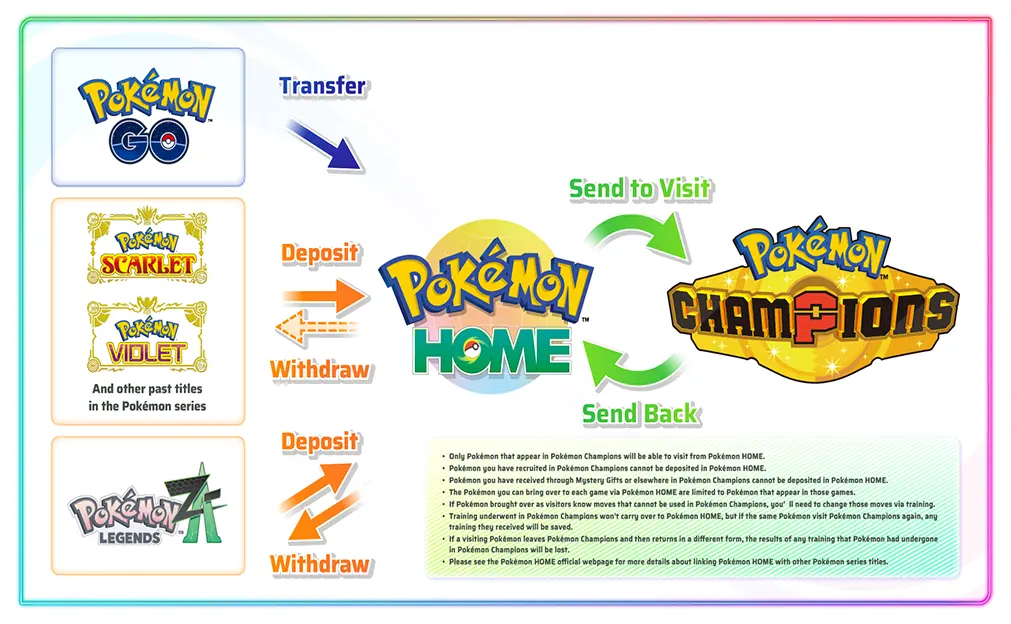
How the “Send to Visit” System Works
The entire system revolves around two actions: send to visit and send back.
When you send a Pokémon to visit, you're temporarily moving it from your HOME Boxes into Pokémon Champions. It becomes a “visiting Pokémon” that you can use in battles.
After you're done, you can send it back to HOME without losing it.
But here’s the part that trips most players up:
Any Pokémon you obtain inside Champions cannot be sent back to HOME.
Think of Champions as a one-way recruitment zone. Your own Pokémon can come and go—but anything you pick up there stays there.
Step-by-Step: How to Send Pokémon to Champions (Switch)
Once everything is set up, the actual process is pretty straightforward—but it has to be done on the Switch version of HOME.
Start by opening Pokémon HOME on your Nintendo Switch. From the main menu, go into your Pokémon Boxes, then select Pokémon Champions as the destination.
If your account is linked correctly, Champions will appear as an available option.
From there, just choose the Pokémon you want to send—whether it’s something like a Koraidon from Violet or a Shiny you brought over from Pokémon GO—confirm the move, and press the + button to save.
One important thing to keep in mind: even if you mainly use the mobile version of HOME, actual transfers can only be done on Switch.
If you’re putting together a competitive team, this is usually where people hit a wall—missing one or two key Pokémon.
Instead of grinding multiple games, most players just fill those gaps first, then fine-tune everything inside Champions.
That way, you can focus on testing builds instead of wasting time catching the same Pokémon again.
Move Compatibility & Training (Where Most Mistakes Happen)
When you send Pokémon from games like Scarlet/Violet or Pokémon Legends: Z-A into Champions, you might notice something off—some of their moves won’t carry over.
That’s because not every move exists in Champions.
To fix this, you’ll need to use the Training system inside Champions to adjust their moves, stats, and overall build so they actually work in this environment.
Here’s where it gets important:
If you train a Pokémon in Champions and then send it back to HOME, that training data is saved. The next time you send it to visit again, it will keep those adjustments.
However, if you send it back to HOME, move it into another game like Scarlet/Violet, and change its form, all of that training data gets reset.
In other words:
Don’t keep bouncing Pokémon between games unless you have to.
That’s the easiest way to accidentally wipe a perfectly tuned build.
Limited-Time Bonus: Free Mega Stones from Z-A
There’s also a limited-time bonus tied to Pokémon Legends: Z-A that’s worth grabbing early.
By sending specific Pokémon from Z-A to visit Champions via HOME, you’ll receive their corresponding Mega Stones directly in your Champions mailbox.
This includes:
- Chesnaught → Chesnaughtite
- Delphox → Delphoxite
- Greninja → Greninjite
- Eternal Flower Floette → Floettite
Just keep in mind—only Pokémon that originated from Z-A will trigger these rewards.
How to Use This System Efficiently
Once you strip away the confusion, the best way to use this system is pretty simple:
Treat Pokémon Champions as a battle testing ground, not a progression game.
Bring in already-built Pokémon from Scarlet/Violet, adjust their moves inside Champions, and use it to test and refine your setups.
The less you move Pokémon back and forth, the fewer problems you’ll run into—and the more value you’ll get out of the system.


